
 Veröffentlicht von
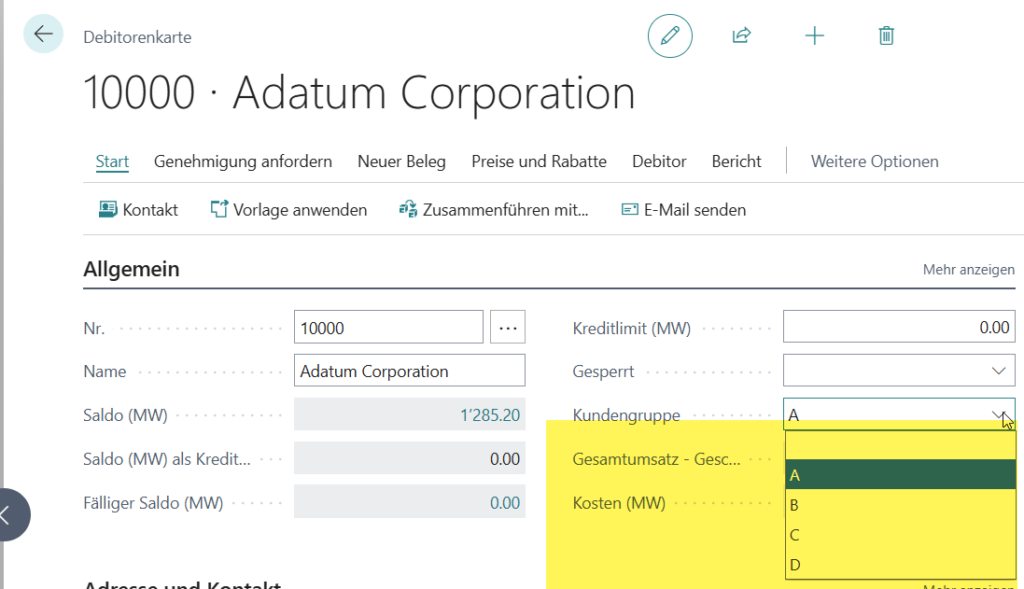
 Wir erstellen eine AL App, welche als Beispiel in der aktuellen BC Version die Kundentabelle um ein enum Feld Kundengruppe erweitert. Dieses wird dann auf den Verkaufsauftrag und die gebuchten Verkaufsrechnungen, Lieferscheine vererbt.
Vorbereitend ist hier ein Claude Pro Abo notwendig. Darin ist Claude Code integriert.
Installation der Claude App erfolgt per Powershell auf einem Windows PC mit folgendem Befehl:
irm https://claude.ai/install.ps1 | iexAls nächstes wird in VSCode eine „leere App“ erstellt mit AL go bzw. eine vorhandene Template Vorlage verwendet.
Nachfolgend die AL Packages in VSCode mit Ctrl+Shift+P „AL:Download Symbols“ herunterladen.
In der App wird dann eine Textdatei Claude.MD erstellt.
Diese beinhaltet den Prompt mit den spezifischen Anforderungen für die gewünschte Erweiterung.
Wichtig hier das eine Struktur im Prompt eingehalten wird.
Claude funktioniert am besten mit dem 5 Säulen Prinzip:
Rolle, Kontext, Format, Beispiele und Einschränkungen.
Hier das Beispiel für diese Struktur mit unseren Anforderungen.
# CLAUDE.md

This file provides guidance to Claude Code (claude.ai/code) when working with code in this repository.

## Project Overview

This is a **Microsoft Dynamics 365 Business Central** AL extension called **Claude Customer Extension**. It is built using the AL programming language and targets Business Central runtime 16.0 (application 27.0).

The purpose is extend the customer table with a enum field CustomerClass - German Caption "Kundengruppe".
Enum Values: A, B, C, D which is passed through to the sales orders and posted sales orders
and posted sales shipments

### Requirements

1. **Table extensions** — Extend Customer table with field CustomerClass
   - Extend sales orders and posted sales orders and posted sales shipments
   - Use German Caption on new fields
2. **Pages extension (Codeunit)** — Extend Customer Page in register general after field blocked and the customer list page.
  - Extend Sales Order Page in register general after field external document no.
  - Extend Posted Sales Invoice Page in register general after field "closed"
  - Extend Posted Sales Shipment Page in register general after field "Order No."
3. **Mgmt Sales (Codeunit)** — A pure AL codeunit that includes the events for passing the field CustomerClass.

## Build and Deploy

- **IDE**: VS Code with the AL Language extension (`ms-dynamics-smb.al`)
- **Build**: `AL: Package` (Ctrl+Shift+B) compiles `.al` files into a `.app` package
- **Deploy/Publish**: `AL: Publish without debugging` (Ctrl+F5) or `AL: Publish` deploys to the BC sandbox
- **Debug**: F5 launches against the cloud sandbox configured in `.vscode/launch.json`

## Server Configuration

The app targets a **cloud sandbox** Business Central instance:
- **Environment name**: `Test_260211_SiKa`
- **Environment type**: Sandbox
- **Tenant**: `1d98c3d6-9b34-4021-8653-bf1d4da1897a`
- **Startup object**: Page 21
- **Schema update mode**: ForceSync

## Architecture

- **Object ID range**: 50000–53149 (assigned in `app.json`)
- **Runtime**: 16.0 / **Application**: 27.0.0.0
- **Dependencies**: Standard BC base symbols only (System, System Application, Base Application, Business Foundation) — no third-party dependencies
- **Feature flags**: `NoImplicitWith` is enabled — all `with` blocks must be explicit

### Planned Object Layout

Additional objects  may use IDs 50001–53149 as needed.

## AL Language Conventions

- All objects must use IDs within the **50000–53149** range
- Use **explicit** `with` statements (implicit `with` is disabled via `NoImplicitWith`)
- Symbol packages are stored in `.alpackages/` and should not be edited manually
- Follow standard AL casing: PascalCase for procedures, objects, and fields
- All source files live under `src/` with separate subfolders: `src/Tables`, `src/Pages`, `src/Codeunits`, `src/Reports`, `src/XMLPorts`, `src/TableExtensions`, `src/PageExtensions`, `src/Enums`, `src/PermissionSets`
- extend all customer extensions with suffix SIK
- naming convention ObjectName + Suffix + .Object Type + .al
- comment all extensions with SIK001
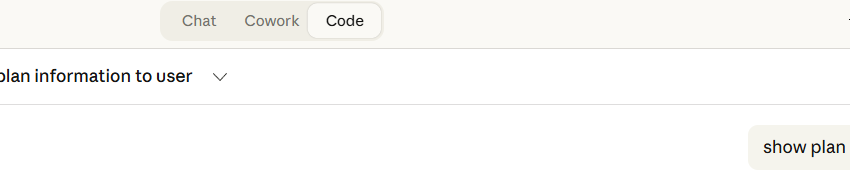
Als nächste wird die Claude App geöffnet, wechsel ins Register Code und den Befehl „show plan“ ausführen.
Damit wird der Arbeitsweg und die Überlegungsschritte von Claude sichtbar.

Dann das Repository Verzeichnis in der App für den Zugriff auswählen und mit dem Befehl „read claude.md“ die
KI Abfrage starten. Für AL Abfragen ist bevorzug die leistungsfähigste Variante Opus 4.x auszuwählen.
Es erfolgt der geplante Ausführungsweg.
Here is the implementation plan based on the CLAUDE.md requirements and current project state:
Project Plan — Claude Customer Extension
Status: No AL source files exist yet — starting from scratch.
Objects to Create
| # | File | Object | ID | Description |
|---|---|---|---|---|
| 1 | Enum.CustomerClass.al | Enum | 50000 | CustomerClass with values A, B, C, D |
| 2 | TableExt.Customer.al | TableExtension | 50000 | Extend Customer (18) with CustomerClass field |
| 3 | TableExt.SalesHeader.al | TableExtension | 50001 | Extend Sales Header (36) with CustomerClass |
| 4 | TableExt.SalesInvoiceHeader.al | TableExtension | 50002 | Extend Sales Invoice Header (112) with CustomerClass |
| 5 | TableExt.SalesShipmentHeader.al | TableExtension | 50003 | Extend Sales Shipment Header (110) with CustomerClass |
| 6 | PageExt.CustomerCard.al | PageExtension | 50000 | Extend Customer Card (21) — General tab, after Blocked |
| 7 | PageExt.CustomerList.al | PageExtension | 50001 | Extend Customer List (22) — add CustomerClass column |
| 8 | PageExt.SalesOrder.al | PageExtension | 50002 | Extend Sales Order (42) — General tab, after Ext. Doc No. |
| 9 | PageExt.PostedSalesInvoice.al | PageExtension | 50003 | Extend Posted Sales Invoice (132) — General tab, after Closed |
| 10 | PageExt.PostedSalesShipment.al | PageExtension | 50004 | Extend Posted Sales Shipment (130) — General tab, after Closed |
| 11 | Codeunit.MgmtSales.al | Codeunit | 50000 | Event subscribers to flow CustomerClass from Customer → Sales Header → Posted docs |
Data Flow
Customer.CustomerClass
    └─► Sales Header (via OnBeforeInsert / Validate event)
            └─► Sales Invoice Header (via posting codeunit events)
            └─► Sales Shipment Header (via posting codeunit events)
The MgmtSales codeunit will subscribe to:
OnAfterValidateEventon Sales Header’s Sell-to Customer No. to copy CustomerClassOnBeforeInsertSalesInvoiceHeader/OnBeforeInsertSalesShipmentHeaderto carry the field through posting
Conventions (from CLAUDE.md)
- All object names suffixed with SIK
- All extensions commented with SIK001
- IDs in range 50000–53149
NoImplicitWith— no implicitwithblocks- PascalCase throughout
Danach kann man den Claude.md Prompt noch entsprechend optimieren und jeweils wieder mit „relaud cloude.md“ die Analyse ergänzen lassen.
CLAUDE.md reloaded. The naming convention has been updated — note the dot separator before the object type:
ObjectName + Suffix + .ObjectType + .al
Updated Plan — File Structure
ClaudeCustomerClass/
├── Enums/
│   └── CustomerClassSIK.Enum.al                  (ID 50000)
├── TableExtensions/
│   ├── CustomerSIK.TableExt.al                   (ID 50000)
│   ├── SalesHeaderSIK.TableExt.al                (ID 50001)
│   ├── SalesInvoiceHeaderSIK.TableExt.al         (ID 50002)
│   └── SalesShipmentHeaderSIK.TableExt.al        (ID 50003)
├── PageExtensions/
│   ├── CustomerCardSIK.PageExt.al                (ID 50000)
│   ├── CustomerListSIK.PageExt.al                (ID 50001)
│   ├── SalesOrderSIK.PageExt.al                  (ID 50002)
│   ├── PostedSalesInvoiceSIK.PageExt.al          (ID 50003)
│   └── PostedSalesShipmentSIK.PageExt.al         (ID 50004)
└── Codeunits/
    └── MgmtSalesSIK.Codeunit.al                  (ID 50000)
The only change from the previous plan is the dot before the object type in filenames (e.g., .TableExt.al instead of TableExt.al). All other conventions remain the same.
Sobald alles passt mit dem Befehl „proceed please“ das Erstellen der App Objekte starten. Auch hier wird während des Prozesses wieder alles sauber aufgelistet, was umgesetzt wurde.
proceed pleaseCreated folder structure and CustomerClassSIK enum file
Created folder structure and CustomerClassSIK enum file
Now create all 4 table extensions in parallel:Updated todo list with folder structure and enum creation tasks
Updated todo list with folder structure and enum creation tasks
Write/c/DevOps/ClaudeCustomerClass/TableExtensions/CustomerSIK.TableExt.al
Write/c/DevOps/ClaudeCustomerClass/TableExtensions/SalesHeaderSIK.TableExt.al
Write/c/DevOps/ClaudeCustomerClass/TableExtensions/SalesInvoiceHeaderSIK.TableExt.al2 weitere anzeigen
Now create all 5 page extensions in parallel:Created folder structure and AL enum file
Created folder structure and AL enum file
All 11 files have been created. Here’s the complete summary:
✅ Done — 11 files created
Enums/
| File | ID |
|---|---|
CustomerClassSIK.Enum.al | 50000 |
TableExtensions/
| File | ID | Extends |
|---|---|---|
CustomerSIK.TableExt.al | 50000 | Customer (18) |
SalesHeaderSIK.TableExt.al | 50001 | Sales Header (36) |
SalesInvoiceHeaderSIK.TableExt.al | 50002 | Sales Invoice Header (112) |
SalesShipmentHeaderSIK.TableExt.al | 50003 | Sales Shipment Header (110) |
PageExtensions/
| File | ID | Extends | Placed after |
|---|---|---|---|
CustomerCardSIK.PageExt.al | 50000 | Customer Card (21) | Blocked |
CustomerListSIK.PageExt.al | 50001 | Customer List (22) | No. |
SalesOrderSIK.PageExt.al | 50002 | Sales Order (42) | External Document No. |
PostedSalesInvoiceSIK.PageExt.al | 50003 | Posted Sales Invoice (132) | Closed |
PostedSalesShipmentSIK.PageExt.al | 50004 | Posted Sales Shipment (130) | Closed |
Codeunits/
| File | ID |
|---|---|
MgmtSalesSIK.Codeunit.al | 50000 |
The codeunit subscribes to three events:
Sales Header → OnAfterValidateEvent("Sell-to Customer No.")— copiesCustomerClassfrom Customer when the customer is selectedSales-Post → OnBeforeSalesInvHeaderInsert— carriesCustomerClassthrough to the posted invoiceSales-Post → OnBeforeSalesShptHeaderInsert— carriesCustomerClassthrough to the posted shipment
Use Ctrl+Shift+B to build and Ctrl+F5 to publish to your Test_260211_SiKa sandbox.
Weitere nachträgliche Korrekturen können über ergänzende Prompts in der Claude App durchgeführt werden.
Bashfind /c/DevOps/ClaudeCustomerClass/src -type f -o -type d | sort
/c/DevOps/ClaudeCustomerClass/src/c/DevOps/ClaudeCustomerClass/src/Codeunits/c/DevOps/ClaudeCustomerClass/src/Codeunits/MgmtSalesSIK.Codeunit.alMehr anzeigen
All done. Here’s the final layout:
src/
├── Enums/
│   └── CustomerClassSIK.Enum.al
├── TableExtensions/
│   ├── CustomerSIK.TableExt.al
│   ├── SalesHeaderSIK.TableExt.al
│   ├── SalesInvoiceHeaderSIK.TableExt.al
│   └── SalesShipmentHeaderSIK.TableExt.al
├── PageExtensions/
│   ├── CustomerCardSIK.PageExt.al
│   ├── CustomerListSIK.PageExt.al
│   ├── SalesOrderSIK.PageExt.al
│   ├── PostedSalesInvoiceSIK.PageExt.al
│   └── PostedSalesShipmentSIK.PageExt.al
├── Codeunits/
│   └── MgmtSalesSIK.Codeunit.al
├── Tables/          (empty, ready for use)
├── Pages/           (empty, ready for use)
├── Reports/         (empty, ready for use)
├── XMLPorts/        (empty, ready for use)
└── PermissionSets/  (empty, ready for use)
All 11 AL files are in place, old top-level folders are removed, and CLAUDE.md has been updated to reflect the src/ convention.
reload claude.mdRead CLAUDE.md project documentation file
Read CLAUDE.md project documentation file
CLAUDE.md reloaded. I’ve detected two changes that affect existing files:
| # | Change | Impact |
|---|---|---|
| 1 | German Caption "Kundengruppe" added to the CustomerClass field | All 4 table extensions need Caption = 'Kundengruppe' |
| 2 | Posted Sales Shipment page placement changed from after Closed → after "Order No." | PostedSalesShipmentSIK.PageExt.al needs updating |
Final der App Test – alle gewünschten Anpassungen wurden umgesetzt.